What is Google Plus? google plus with text google+, if there are they don't know about it I will give you a little info about google plus, google plus is a social networking service like other social networking services like twitter, facebook etc, already using Google Plus.
If you already have a gmail.com account we certainly will be given access to google plus, so visit to plus.google.com after we fill the important parts like the update name, information about you, etc., then surely google plus account we have want to have a lot of friends. With the new look of Google Plus the editing and adding friends more easily.
You can use google+ on android phone here the link to download google plus
1. Sign in to your google plus account.
2. If the display as shown below and on the homepage with many others picture or people shown that we can add as a friend point your mouse cursor to text name of people yo want add and the tab option will be shown to add to your circle do you have, click on the circle to add then automatically will add to your circle, a circle on twitter as means follower if they add you back they are following.
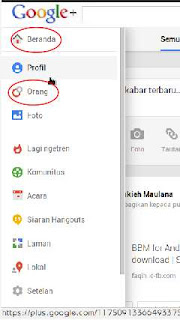
 3. If no one in home page to add into circle then move your mouse to the left side point to Home link as shown above, and it will pop up a widget to switch profiles, people, photos, pages, etc..
 4. To add a friend we can choose by sync or linking to:
So we can add a lot of friends to google plus account.
5. To add friends on google plus, just point the mouse cursor button to "Add" button as I have mentioned above, and then when the mouse cursor is already in the box "Add" then it will pop up a window to add to a circle we've created.
 In addition about the circles name in google plus. Circle is a name that we can make freely as grouping friends that we will add as a friend, so if in windows OS the circle called the function as a folder.
For example we are going to add to circle on "Friends" and "family", then add your friends to the circle of "family" and "friends" circle, everyone we can add to the various circles we created earlier.
Using google plus you can hang out with the video and with your friends.
Google plus is a social networking that is easy to use and already many who have put on this, and even if you have a blog and google plus already made so we can share status updates automatically.
I hope these tips are not misused for things that are not educated as upload images obscene, racist, pornographic, both religion and law, and I am not responsible for all of it if misused.
Here the video to add friend on google plus :
If you already have a gmail.com account we certainly will be given access to google plus, so visit to plus.google.com after we fill the important parts like the update name, information about you, etc., then surely google plus account we have want to have a lot of friends. With the new look of Google Plus the editing and adding friends more easily.
You can use google+ on android phone here the link to download google plus
How to add friends to a circle and find people on google plus :
1. Sign in to your google plus account.
2. If the display as shown below and on the homepage with many others picture or people shown that we can add as a friend point your mouse cursor to text name of people yo want add and the tab option will be shown to add to your circle do you have, click on the circle to add then automatically will add to your circle, a circle on twitter as means follower if they add you back they are following.


- Yahoo email, which we will be able to add friends there to google plus
- Hotmail, as well as yahoo email
- Upload files, by uploading text file that the data contained therein email name.
So we can add a lot of friends to google plus account.
5. To add friends on google plus, just point the mouse cursor button to "Add" button as I have mentioned above, and then when the mouse cursor is already in the box "Add" then it will pop up a window to add to a circle we've created.

For example we are going to add to circle on "Friends" and "family", then add your friends to the circle of "family" and "friends" circle, everyone we can add to the various circles we created earlier.
Using google plus you can hang out with the video and with your friends.
Google plus is a social networking that is easy to use and already many who have put on this, and even if you have a blog and google plus already made so we can share status updates automatically.
I hope these tips are not misused for things that are not educated as upload images obscene, racist, pornographic, both religion and law, and I am not responsible for all of it if misused.
Here the video to add friend on google plus :


